Website-scoped mappings
Create shortcuts that only work on the sites you choose. Your global shortcuts stay exactly as they are.
Create keyboard shortcuts for webpage actions without changing the shortcuts you already rely on.
Chrome macOS and Windows
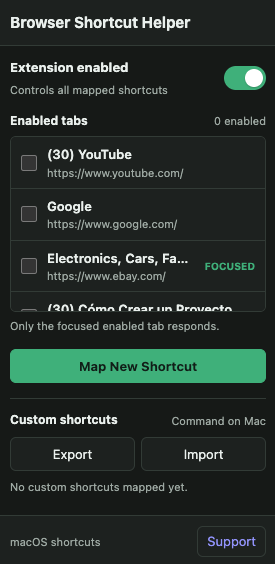
Create shortcuts that only work on the sites you choose. Your global shortcuts stay exactly as they are.
Turn shortcuts on for specific tabs and leave them off everywhere else.
Only the focused, enabled tab responds, helping prevent accidental triggers.
Map, edit, or remove shortcuts whenever your workflow changes.
Back up your mappings or move them to another browser in a few clicks.
Turn on the extension for the tabs where you want shortcuts to work.
Choose the webpage action and set the keyboard shortcut you want.
Press it on that site—only when the enabled tab is focused.
Trigger common webpage actions without reaching for the mouse.
Speed up daily tasks in complex web apps without changing global shortcuts.
Navigate, submit, and move between actions with a shortcut set that fits the task.
Jump, search, and filter with shortcuts that follow how you work.
Make frequently used web actions easier to reach on macOS and Windows.
Your shortcuts and settings stay under your control. GodinApps does not operate a server that receives your mappings, browsing activity, selectors, or settings.
Read the privacy policyYes. Browser Shortcut Helper works in Chrome on both macOS and Windows, with platform-appropriate shortcut display.
No. Mappings are scoped to the website where you create them and respond only in a focused tab you have enabled.
Mappings and settings use Chrome Storage Sync. Temporary enabled-tab identifiers use Chrome session storage.
Uninstalling removes local extension data. You can also clear synchronized extension data through your Google Chrome account where applicable.
Questions about setup, shortcuts, or privacy? We’re here.